How to Post to Multiple Social Media Platforms at Once
Learn how to post to multiple social media platforms at once without copy-pasting the same content everywhere, so every channel gets a format that fits.
Most small business owners don't have a social media problem. They have a time problem that looks like a social media problem. You have one good idea, one channel it goes to, and four others that quietly go dark for weeks. Then someone asks why your Instagram hasn't posted since last month.
The instinct to fix this is to copy-paste the same caption everywhere. It feels efficient, but it usually backfires: a LinkedIn-style paragraph looks out of place on Instagram, a hashtag-heavy caption looks spammy on Facebook, and a post written for X gets cut off and makes no sense on Pinterest. The result is content that technically exists on every platform but performs well on none of them.
The real fix isn't posting more. It's learning to adapt one idea quickly for each format, so you can post to multiple social media platforms at once without it reading like the same recycled update everywhere.
Why copy-pasting the same post everywhere falls flat
Each platform was built around a different habit. People scroll LinkedIn during work hours looking for insight or a quick lesson. They open Instagram for visuals and personality. They check Facebook for community and local updates. They skim X for short, punchy takes. None of these habits match a single one-size-fits-all post.
Platforms also format content differently:
- Caption length limits and how much shows before "see more"
- Whether hashtags help or look out of place
- Whether links are clickable in the post itself or need to go in a comment or bio
- Image and video aspect ratios
- Whether the platform favors native video over links to outside content
Post the same block of text everywhere and you're fighting against all of these defaults at once.
Start with one idea, not one post
The shift that actually saves time is to stop thinking in terms of "a post" and start thinking in terms of "an idea." A single idea — a tip, a behind-the-scenes moment, a customer question you answered, a new product detail — can become several different pieces of content, each shaped for where it's going.
Here's a simple way to work through it:
- Write the idea in one plain sentence. What's the actual point? Not the caption — the point.
- Decide the best format for the idea itself. A quick tip might work best as a short video. A detailed explanation might work best as a LinkedIn post. A product shot might be a Pinterest pin.
- Adapt the idea to each channel from there, rather than trimming one long caption down for everywhere else.
This takes slightly more thought up front but far less rework later, because you're not retrofitting a mismatched post after the fact.
Example: one idea, five channels
Say the idea is: "We just added a new service option for rush orders."
- LinkedIn: A short paragraph explaining why you added it and what problem it solves for customers.
- Facebook: A more conversational version, maybe framed as an announcement to your community.
- Instagram: A simple graphic or short video showing the service in action, with a caption that's shorter and more visual.
- X: One punchy line with the core detail, no extra setup.
- Google Business Profile: A plain, factual update — what the service is, who it's for, how to get it.
Same idea. Five different shapes. None of them feel like a copy-paste job.
Match the format, not just the wording
Adapting content isn't only about rewriting the caption. The format itself needs to change.
Text length and tone
LinkedIn and Facebook tolerate longer, more explanatory posts. X and Instagram captions perform better shorter and more direct. Google Business Profile posts should be plain and informational — skip the hashtags and emojis there entirely.
Visuals
A square image works for Instagram feed and Facebook. A vertical video fits Instagram Reels and TikTok. Pinterest favors tall, graphic-heavy images designed to be saved, not just viewed once and scrolled past. Reusing one image size everywhere means it gets cropped awkwardly on at least two platforms.
Links
Some platforms are link-friendly in the post itself. Others quietly bury posts with outbound links. Know which channel wants the link in the post, which wants it in a comment, and which wants no link at all — just a call to check your bio or profile.
Hashtags
Useful on Instagram and TikTok. Mostly ignored or slightly odd-looking on LinkedIn and Facebook. Not used at all on Google Business Profile. Treat hashtags as a per-platform decision, not a default you tack onto every caption.
Build a lightweight system instead of starting from scratch each time
Once you've adapted an idea for each channel a few times, patterns emerge. You'll notice your LinkedIn posts tend to open with a question or observation, your Instagram captions tend to be short and end with a simple prompt, and your Google Business Profile updates tend to follow the same plain structure every time.
Write these patterns down. A one-page reference with a rough template per channel — tone, length, whether hashtags apply, whether a link goes in the post — removes the guesswork every time you sit down to adapt something new. You're not starting from a blank page on five tabs; you're filling in a known shape five times.
Where scheduling tools genuinely help
None of this requires software. But once you're adapting one idea for five or six channels on a regular schedule, doing it manually — logging into each platform, resizing images, rewriting captions, picking post times — becomes its own time sink.
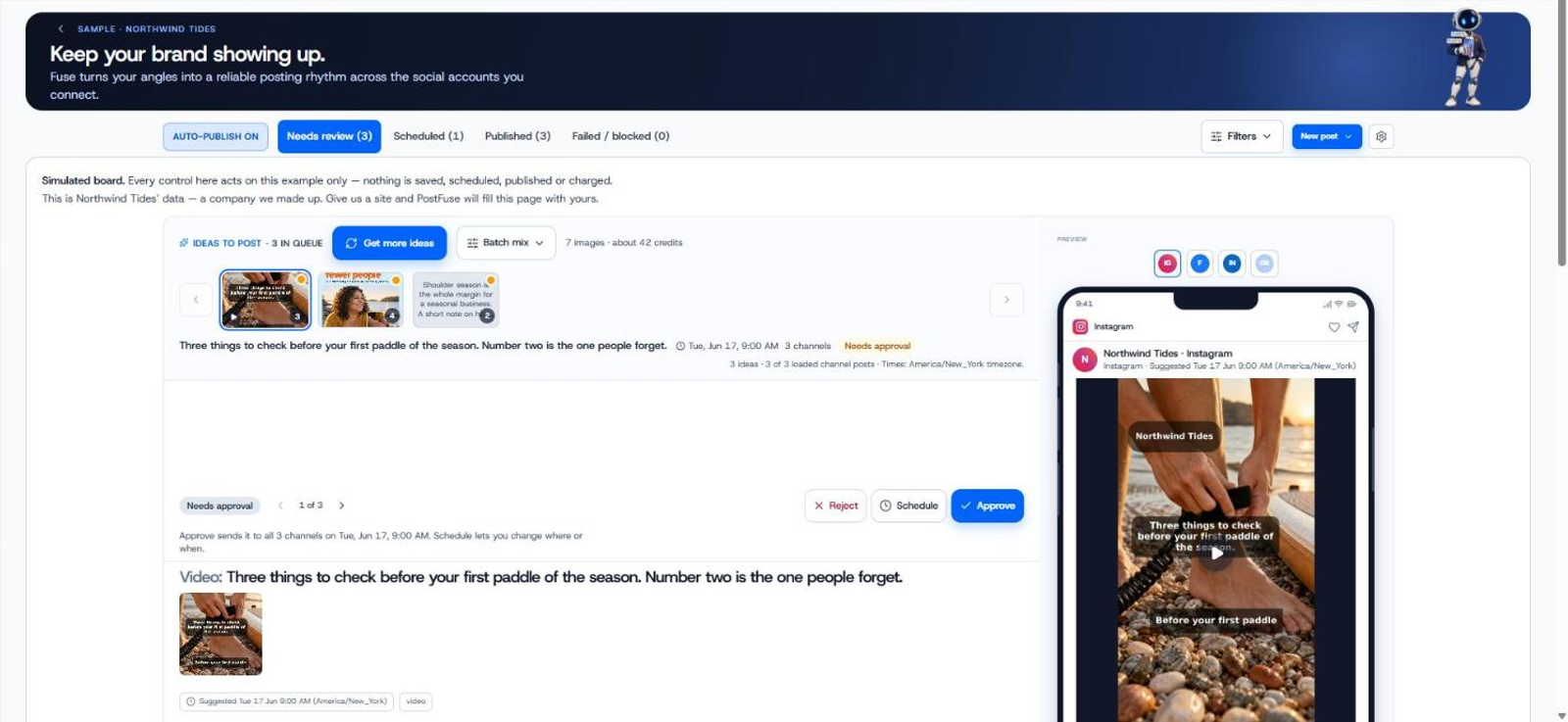
This is where multi-channel publishing tools earn their keep. PostFuse plans, writes and schedules posts for a brand, with the owner able to review everything before it goes live, and publishes to several social channels from one place, including LinkedIn, Facebook, Instagram, X, TikTok, Pinterest and Google Business Profile. It also creates on-brand images and short videos from a brand kit, so you're not manually resizing the same graphic five different ways.
For businesses running ads alongside organic posts, PostFuse also creates and manages ad campaigns on platforms such as Meta, LinkedIn and Google from one place, with approvals for budget changes, and captures leads from lead forms into a built-in lead list. Performance across posts and ads shows up in one dashboard, so you can see what's actually working without logging into five separate tools. Take a look at the full list of PostFuse features to see what fits your workflow.
The point of a tool like this isn't to remove your judgment from the process — it's to remove the repetitive manual work of adapting and publishing the same idea across channels, so you can focus on the idea itself.
A simple workflow to try this week
- Pick one idea you'd normally only post to your busiest channel.
- Write the one-sentence version of the idea first.
- Adapt it into two or three formats — one longer and explanatory, one short and visual, one plain and factual.
- Post each version to the channel it fits best, at the time that channel's audience is usually active.
- Note what felt easy and what felt like a stretch — that tells you where your per-channel templates need work.
Repeat this a few times and the adaptation step gets faster. The goal isn't perfection on every platform. It's making sure none of your channels go silent just because reshaping content for them feels like extra work.
Frequently asked questions
Is it bad to post the exact same content on every platform?
It's not against any rules, but it usually underperforms. Each platform's audience expects a certain length, tone and format, and a post that ignores those defaults tends to get less engagement than one shaped for that specific channel.
How much do I really need to change between platforms?
Not everything needs a full rewrite. Often the core message stays the same and only the length, tone, hashtags and image format change. The goal is fit, not reinvention.
What's the fastest way to adapt one idea for several channels?
Write the plain, one-sentence version of the idea first, then build each platform's version from that sentence rather than editing down a caption you already wrote for a different platform. Having a simple template per channel speeds this up further.
Can a tool actually post to multiple social media platforms at once?
Yes. Scheduling and publishing tools, including PostFuse, let you prepare content once and publish it across several channels from a single place, with the format adapted per platform rather than posted identically everywhere.
Does Google Business Profile need the same treatment as social platforms?
Yes, though its posts should stay plain and factual — skip hashtags and heavy styling. Treat it as its own format rather than an afterthought version of your social captions.
Try PostFuse
If adapting and publishing content across several channels is the part of marketing that keeps slipping, PostFuse is built to handle the repetitive parts — planning, writing, scheduling and publishing posts across channels, with you reviewing before anything goes live.